Financial Management Dashboard for Multi-Brand Business
A comprehensive financial tracking system built in Notion for managing revenue and expenses across multiple income sources and business brands. The system provides real-time visibility into financial performance with automated calculations and categorized reporting.
The problem
The company needed a centralized system to track finances across multiple revenue streams and brands.
Without a unified financial dashboard, the business faced several challenges:
- No real-time overview of total revenue and expenses
- Manual calculations for monthly and yearly financial summaries
- Scattered financial data across different tools and spreadsheets
- Difficulty tracking spending by category and vendor
- Limited visibility into profit margins and balance trends
- Time-consuming monthly financial reporting and reconciliation
The Solution
A fully integrated financial management dashboard with four interconnected databases.
The system automatically tracks all revenue and expenses, calculates balances, and provides multiple views for analyzing financial performance across different dimensions.
The system consists of four core relational databases:

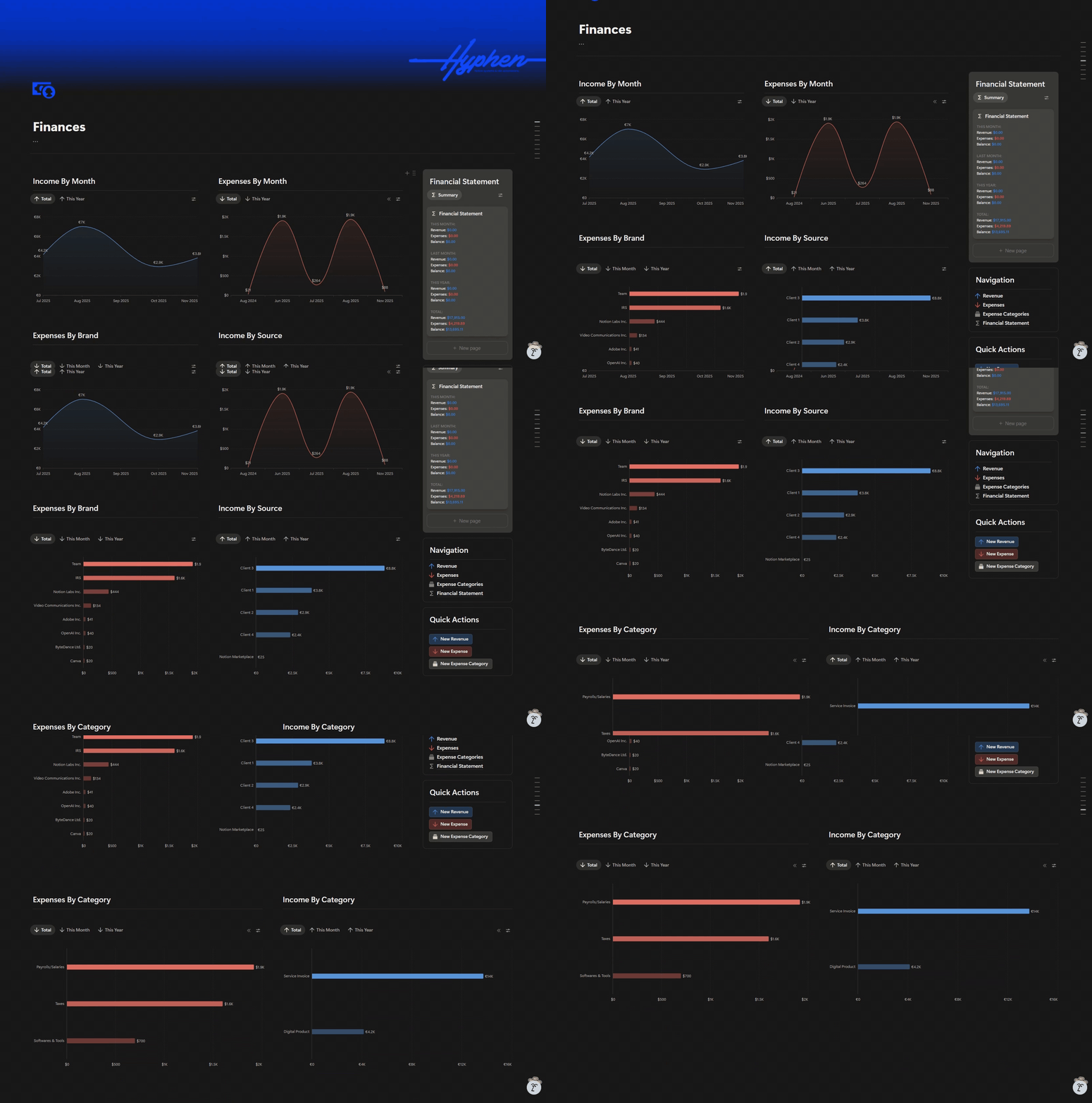
Dashboard Views
The main dashboard provides six different perspectives on financial data at a glance.
Each view is optimized to answer specific business questions:
- Income by Month: Timeline view showing revenue trends over time
- Expenses by Month: Timeline view tracking spending patterns
- Expenses by Brand: Breakdown of costs across different business entities
- Income by Source: Revenue analysis by client and product type
- Expenses by Category: Spending distribution across expense types
- Income by Category: Revenue split between services and digital products
The Financial Statement callout displays the central summary with real-time balance calculations.

Custom Formulas
The Financial Statement database contains 13 custom formulas that automate all financial calculations.
These formulas eliminate manual calculation work:
- Total Revenue and Total Expenses: Aggregate all income and spending
- Balance: Net profit calculation (revenue minus expenses)
- This Month calculations: Current month revenue, expenses, and balance
- Last Month calculations: Previous month financial performance
- This Year calculations: Year-to-date revenue, expenses, and balance
- Summary: Formatted text overview of key financial metrics
The formulas use date-based filtering to automatically segment financial data by time period, providing instant access to current and historical performance without manual updates.

Navigation System
Quick Actions and centralized navigation streamline daily financial tracking.
The dashboard includes:
- Navigation section: Direct links to all four master databases with color-coded icons (blue for revenue, red for expenses)
- Quick Action buttons: One-click access to add new revenue or expense entries from anywhere in the workspace
- Multiple currency support: Revenue tracked in euros, expenses in dollars
- File attachments: Invoice files linked directly to revenue records
Conclusion
The Notion financial dashboard provides complete visibility into business finances with zero manual calculation.
Real-Time Financial Tracking
All revenue and expenses are connected to a central Financial Statement that automatically calculates totals, balances, and time-based summaries.
Multi-Dimensional Analysis
Six different dashboard views let you analyze finances by month, category, source, and brand without switching tools.
Automated Calculations
Custom formulas handle all mathematical operations, from simple totals to complex date-filtered aggregations for monthly and yearly summaries.
Centralized Data
Invoice files, vendor information, payment status, and categorization all live in one workspace, eliminating scattered spreadsheets.
See Other Case Studies